Wednesday, 9 November 2011

DB2 : Select Yesterday Date

Current Date

SELECT DATE(CURRENT TIMESTAMP ) FROM SYSIBM.SYSDUMMY1

Yesterday Date

SELECT DATE(CURRENT TIMESTAMP - 1 DAYS) FROM SYSIBM.SYSDUMMY1

Monday, 31 October 2011

SharePoint 2010 : Make Access by Anonymous Users

SP2010 Tips – Turn on Anonymous Access

Ok, its not really a branding tip, but I’m on a roll here. In SharePoint 2010 if you want to setup your site to allow anonymous visitors, the process is much like it is in SharePoint 2007 except that the ribbon is now part of of the process. While I have really gotten used to the ribbon, this option I find particularly confusing. Just like in SharePoint 2007 the process begins in Central Administration, either you set the web application to Allow Anonymous access in the initial web application creation screen OR you need to set it afterward. If you are going to set it after, click on Manage Web Applications and select a web application from the list and take a look at the ribbon:
image
You might be inclined to click Anonymous Policy as I was initially but this does NOT allow you to turn on Anonymous access. Instead click Authentication Providers:
image
From this menu you select an Authentication Provider:
image
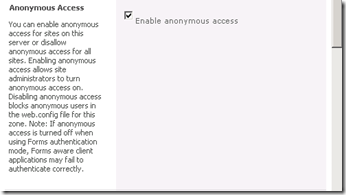
The from the next menu you can check Enable anonymous access:
image
After you click save, the web application will allow Anonymous access to be set, but you have to set this from the actual web application. So now, navigate to the top level site collection for the web application and click Site Actions > Site Settings > Site Permissions. From that menu you can click Anonymous Access:
image
From there select Entire Web Site and click OK:
image
That’s all you have to do, now the site will be available for browsing by anyone. Really only the first step is confusing compared to SharePoint 2007.

Sunday, 30 October 2011

DB2 : Select Current Year Records

Example:

SELECT Count(EL.SCREEN_MODULE_NAME) as ESH_NOOFHITS_CY,AT.DATE_TIME as ESH_TIMESTAMP_CY
FROM AUDT.TBL_AUDIT_TRAIL_SYSTEM AT ,ESERVICES_LIST EL
WHERE
RTRIM(AT.SCREEN_MODULE_NAME) LIKE  '%'  CONCAT RTRIM( EL.SCREEN_MODULE_NAME) CONCAT '%'  AND
Year(CURRENT TIMESTAMP)=Year(DATE_TIME)
GROUP BY AT.DATE_TIME
ORDER BY DATE(AT.DATE_TIME) ;

DB2 : Select Current Month Records

Example:

SELECT Count(EL.SCREEN_MODULE_NAME) as ESH_NOOFHITS_CM,AT.DATE_TIME as ESH_TIMESTAMP_CM
FROM AUDT.TBL_AUDIT_TRAIL_SYSTEM AT ,ESERVICES_LIST EL
WHERE
RTRIM(AT.SCREEN_MODULE_NAME) LIKE  '%'  CONCAT RTRIM( EL.SCREEN_MODULE_NAME) CONCAT '%'  AND
days(AT.DATE_TIME) between days(CURRENT TIMESTAMP)-34 AND days(CURRENT TIMESTAMP) AND Year(CURRENT TIMESTAMP)=Year(AT.DATE_TIME)
GROUP BY AT.DATE_TIME
ORDER BY DATE(AT.DATE_TIME) ;

DB2 : Select Last 7 days

Example:
SELECT Count(EL.SCREEN_MODULE_NAME) as ESH_NOOFHITS_WEEK,AT.DATE_TIME as ESH_TIMESTAMP_WEEK
FROM AUDT.TBL_AUDIT_TRAIL_SYSTEM AT ,ESERVICES_LIST EL
WHERE
RTRIM(AT.SCREEN_MODULE_NAME) LIKE  '%'  CONCAT RTRIM( EL.SCREEN_MODULE_NAME) CONCAT '%'  AND
YEAR(AT.DATE_TIME)=YEAR(CURRENT TIMESTAMP) AND
days(AT.DATE_TIME) between days(CURRENT TIMESTAMP)-6 AND days(CURRENT TIMESTAMP)
GROUP BY AT.DATE_TIME
ORDER BY DATE(AT.DATE_TIME) ;

Wednesday, 26 October 2011

SharePoint 2010 : exception occurred when trying to issue security token

How to deal with SharePoint 2010 exception "An exception occurred when trying to issue security token: The server was unable to process the request due to an internal error"

Scenario:

You receive the below exception when you try to logon to a site that has been configured to use Claims Based Authentication with a custom membership provider using FBA credentials:

Event ID from Event Log  - 8306

An exception occurred when trying to issue security token: The server was unable to process the request due to an internal error.  For more information about the error, either turn on IncludeExceptionDetailInFaults (either from ServiceBehaviorAttribute or from the <serviceDebug> configuration behavior) on the server in order to send the exception information back to the client, or turn on tracing as per the Microsoft .NET Framework 3.0 SDK documentation and inspect the server trace logs..

Explanation:

This error started to appear in our QA environment which does not have Visual Studio installed. I have tried starting the service "Claims to Windows Token Service" but that did not help either.

I have made sure that all configuration changes required for FBA have been made properly in the below web.config files:

  • Web Applications
  • CA Web Aplication
  • \14\WebServices\SecurityToken
This post can get you started with building a custom membership provider and making changes to the required configuration files.

Error
Resolution:
To view more information about the actual error that is preventing the secure token service from being able to issue security token, I added the service debug in the web.config for the web service, under \14\WebServices\SecurityToken:
<serviceDebug includeExceptionDetailInFaults="True" httpHelpPageEnabled="True"/>
After adding the above to SecurityToken's web.config, the event log reported the below:
ServiceDebug

An exception occurred when trying to issue security token: The configuration section for Logging cannot be found in the configuration source..

I then realized that it is Microsoft.Practices.EnterpriseLibrary.Logging from my custom membership code that is causing the issues and not FBA configuration as I originally thought.

I then went ahead and added the required configuration for Microsoft.Practices.EnterpriseLibrary.Logging
Everything after that worked as desired. So I strongly advice everyone not to panic and take such drastic steps as re-installing SharePoint 2010 etc.. When I googled for this error, many people suggested to reinstall SharePoint 2010, change server names, etc.. Remember that these things happen for a reason. It just requires some patience to figure out the exact problem.

Tuesday, 25 October 2011

SCOM 2007 R2 - Operations Console will not open

Operations Console will not open – SDK service has not yet initialized

Answer:

Restart the blow services
  • SNMP Trap
  • System Center Data Access
  • System Center Management
  • Remote Access Auto Connection Manager
  • Remote Access Connection Manager
  • Remote Desktop Services
  • Remote Desktop Configuration